Design • Development • Manufacturing
Stock OffersContact

APPLICATIONS

Smart Bed-Exit Monitoring

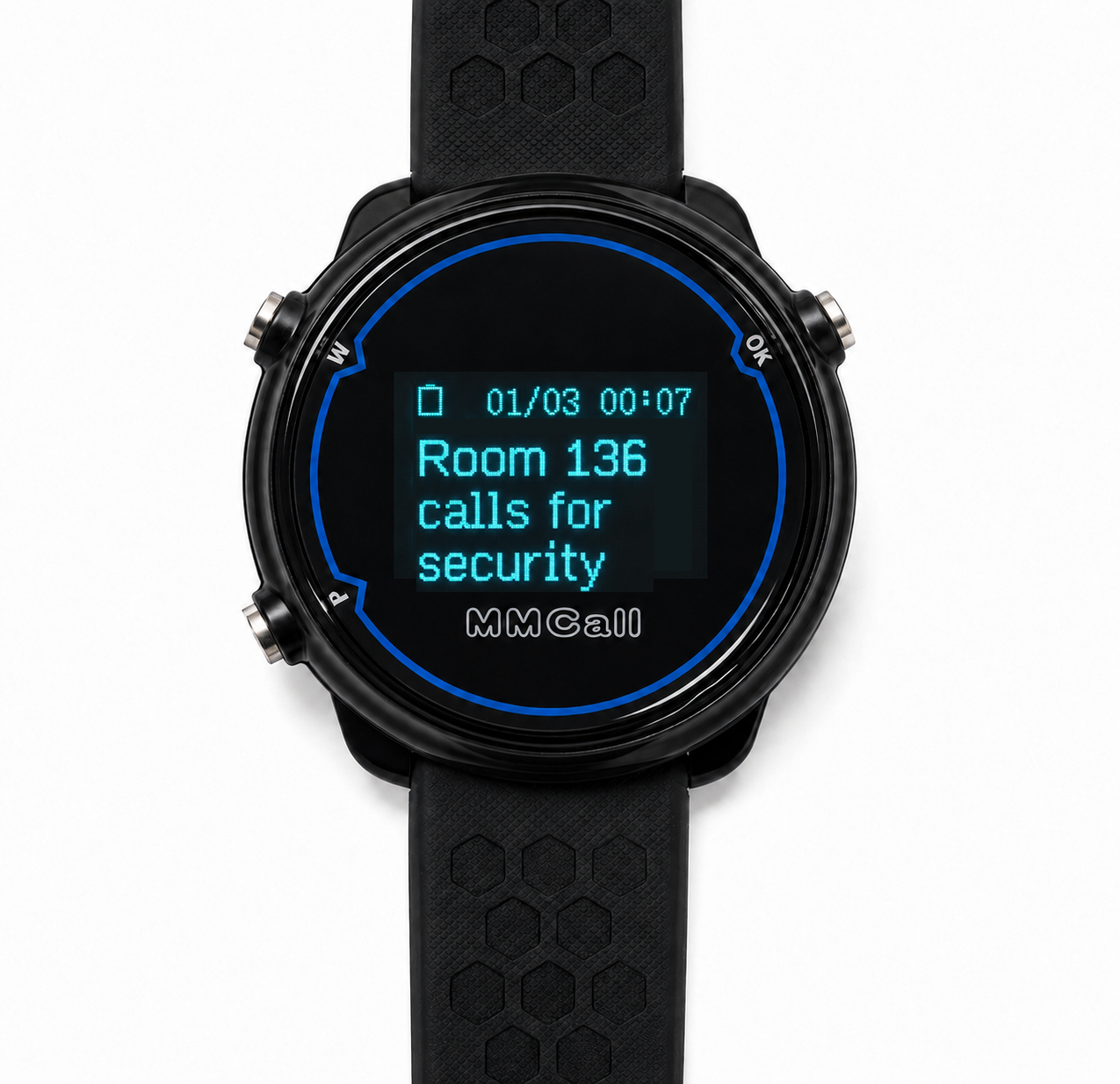
The MMCall Smart Bed-Exit Monitoring System uses pressure-sensitive bed pads and wireless communication to monitor bed occupancy and send alerts to care staff. The system can automatically detect when a resident leaves or returns to bed. Care teams can set different alert times for different beds, view bed status on a central computer, and receive notifications through compatible wireless watch pagers. The goal is not to stop residents from moving freely. It is to help care teams stay informed and provide assistance when needed.

Smart Bed-Exit Monitoring

Support Residents Who May Need Help Getting Out of Bed

Why Bed-Exit Monitoring Matters


Getting out of bed is a normal part of everyday life.

However, some older adults and patients may have difficulty standing, walking, or moving without assistance.

This may be especially important for residents who need help with nighttime bathroom visits, people with limited mobility, or patients recovering from medical treatment.

Care facilities need a practical way to monitor selected beds while respecting residents' independence.

Common Challenges in Care Facilities

Unexpected Bed Exits at Night

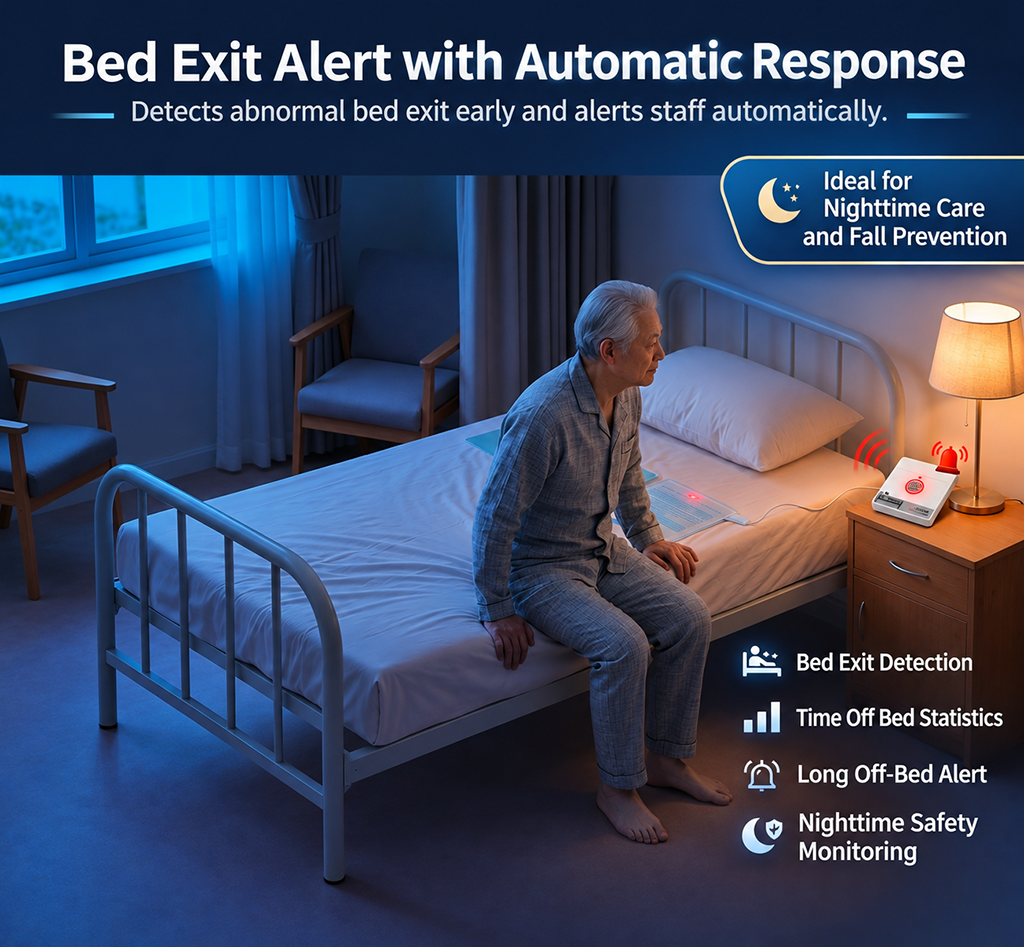
A resident may leave the bed without calling for help. Staff may not know that assistance is needed.

Multiple Rooms to Monitor

One caregiver may be responsible for several residents. Checking every room continuously is not practical.

Different Residents Have Different Needs

Some residents need staff assistance immediately after leaving bed. Others can safely move around independently for a period of time.

Too Many Unnecessary Alerts

If every short bed exit triggers an immediate alarm, staff may receive notifications that do not require action.

Limited Bed-Exit Records

Without a central monitoring system, it can be difficult to review when bed exits occurred, how long they lasted, or how often alerts were generated.

A More Flexible Way to Monitor Bed Occupancy

MMCall helps care teams monitor selected beds, set alert rules for individual residents, and receive information through both fixed and mobile devices.

Four Steps from Bed Monitoring to Caregiver Notification

How the MMCall Bed-Exit Monitoring System Works

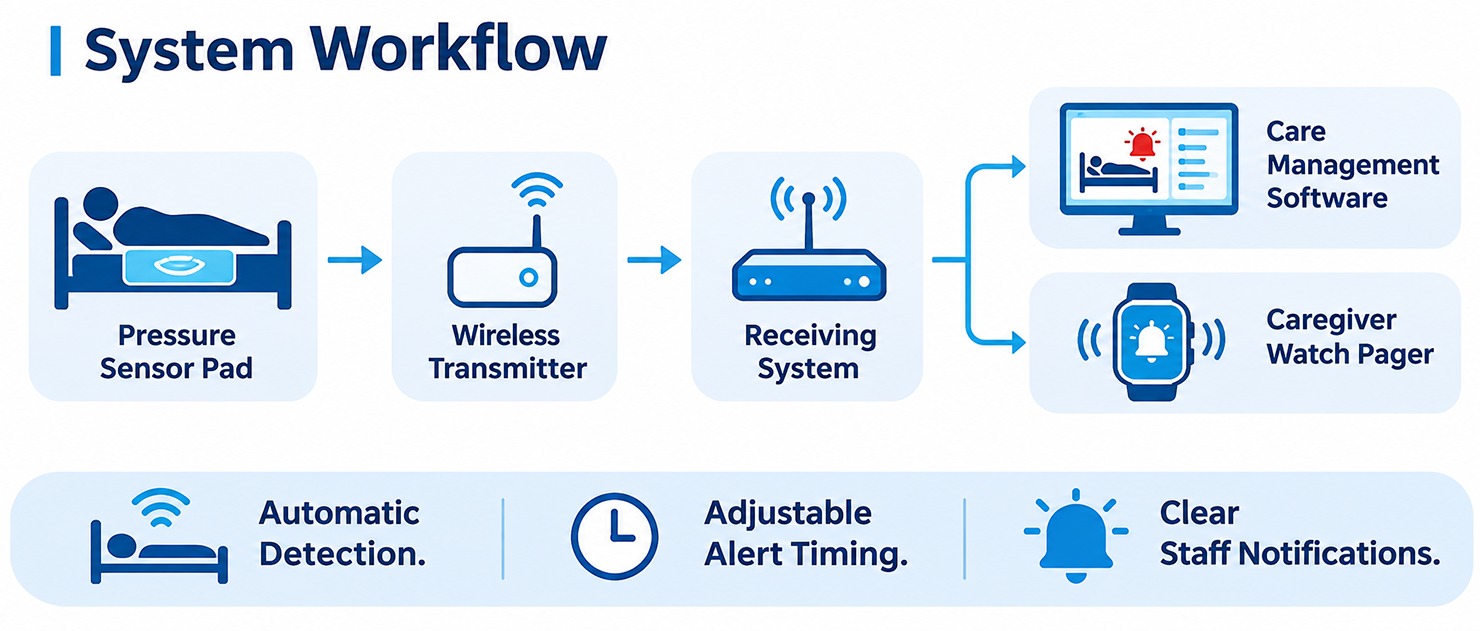
The MMCall system combines a pressure-sensitive bed pad, wireless transmitter, compatible receiving equipment, and care management software.

It monitors changes in bed occupancy and sends information to the configured care management system.

Step 1 — Detect Bed Occupancy Automatically

A pressure-sensitive sensor pad is installed on the bed in the appropriate position, typically on top of the mattress and beneath the sheet, according to the device instructions.

When the resident is in bed, the sensor detects pressure.

When the resident leaves the bed, the pressure changes, and the sensor sends a status signal through its wireless transmitter.

No button pressing or wearable device is required for the resident.

Step 2 — Start the Bed-Exit Timer

When the system detects that a resident has left the bed, it begins tracking the time away from the bed.

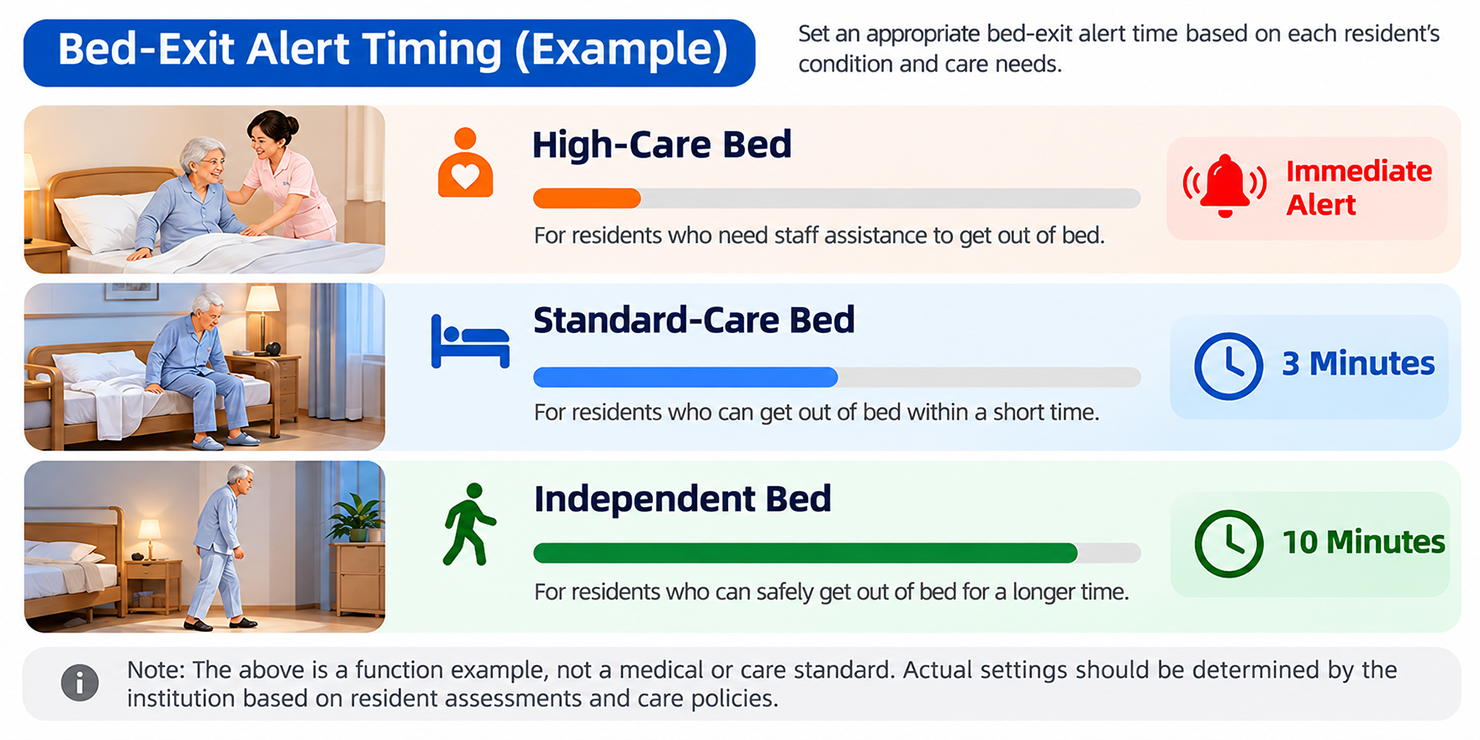
Care staff can set an alert time for each monitored bed.

For example:

  • Immediate notification for a resident who needs help getting up
  • A short delay for someone who may return quickly
  • A longer delay for a resident who can move independently

Step 3 — Send an Alert When Needed

If the resident returns within the allowed time, the system updates the bed status without sending an overdue bed-exit alert.

If the resident remains out of bed longer than the configured time, the system can notify the nursing station and compatible caregiver receiving devices.

The notification can include the room number, bed number, and bed-exit status.

Step 4 — Caregiver Response & Event Records

Care staff can check the notification, visit the resident when needed, and follow the facility's care procedures.

The software can record bed occupancy changes, bed-exit times, alert events, and related history for later review.


More Than a Bed Alarm — A Centralized Monitoring Solution

Six Key System Features


01. Automatic Bed Occupancy Detection

Know Whether a Monitored Bed Is Occupied or Empty.

MMCall uses pressure-sensitive bed pads to detect changes in bed occupancy.

The system can identify when a resident leaves the bed and when the sensor detects their return.

Residents do not need to wear a personal transmitter or press a call button to trigger this monitoring function.

This is especially useful for individuals who may forget to call for help or have difficulty operating a call device.

02. Adjustable Bed-Exit Alert Times

Different Residents. Different Alert Settings.

Not everyone needs an immediate bed-exit alert.

MMCall allows care teams to configure the waiting time for each monitored bed.

For example, a resident who requires assistance when standing may need an immediate alert. Another resident may be allowed several minutes to visit the bathroom independently.

By setting alerts according to individual care needs, staff can focus on situations that require attention.

03. Centralized Bed Status Monitoring

Monitor Multiple Rooms from One Nursing Station.

MMCall care management software can display the status of multiple monitored beds in one interface.

Care staff can identify beds that are occupied, beds where residents have left, and beds that have reached their alert time limits.

The software supports monitoring by room or bed number, helping staff review information across different care areas.

04. Wireless Caregiver Notifications

Receive Alerts While Moving Around the Facility.

Caregivers do not always stay at the nursing station.

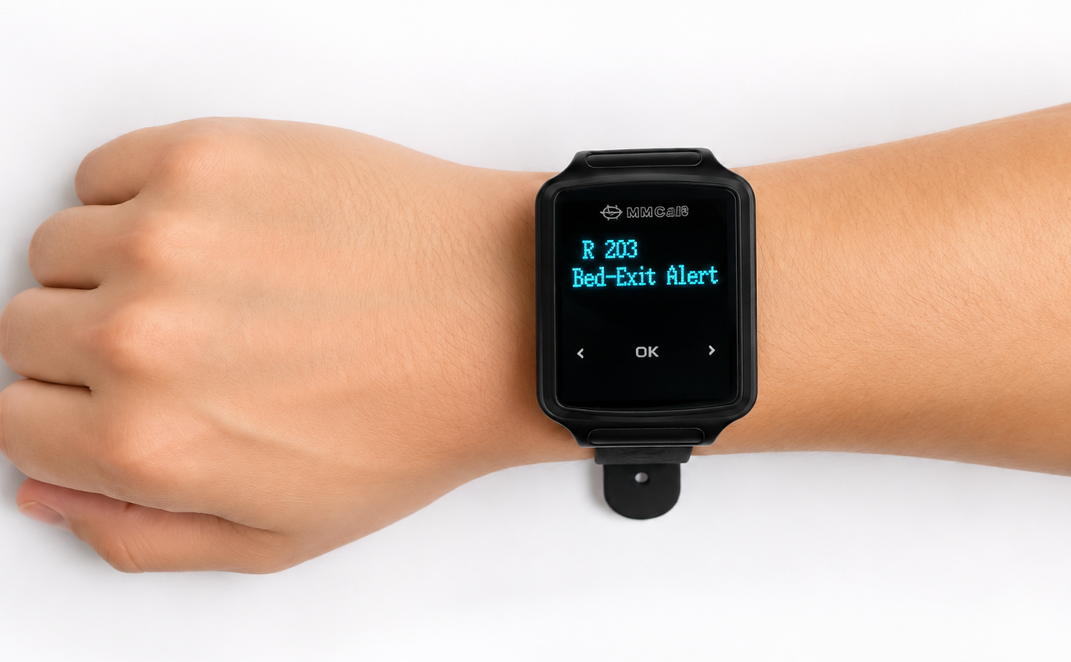
With compatible MMCall wireless watch pagers, staff can receive bed-exit notifications while working in other rooms or care areas.

Notifications can show the relevant room, bed, and event information.

Optional wireless receivers and other supported notification devices can be included according to the system configuration.

05. Bed-Exit Event History & Reports

Review Bed-Exit Activity Over Time.

Compatible management software can record bed occupancy changes and alert events.

Care managers can review information such as:

  • Bed-exit time
  • Bed-exit duration
  • Alert events
  • Room and bed information
  • Nighttime bed-exit activity
  • Historical monitoring records

These records can help care teams review monitoring needs, nighttime routines, and staff response procedures.

Available reports and export functions depend on the software version.

06. Integration with Wireless Nurse Call Systems

Combine Automatic Monitoring with Resident-Initiated Calling.

Bed-exit monitoring can be one part of a broader MMCall care communication system.

Depending on the project, compatible devices may include:

  • Wireless bedside call buttons
  • Bathroom emergency pull cords
  • Caregiver watch pagers
  • Nursing station receivers
  • LED notification displays
  • Care management software

This allows care facilities to plan a more complete system that supports both automatic bed monitoring and resident-initiated assistance requests.

Support Independence While Keeping Care Staff Informed

Personalized Alerts for Different Care Needs

Every resident has different mobility levels, routines, and support needs.

A person-centered care approach means using monitoring settings that match the individual's care plan rather than applying the same alert rule to everyone.

MMCall supports different alert timing options for different beds.

Option A — Immediate Bed-Exit Alert

For Residents Who Need Assistance When Getting Up

An alert is generated when the system detects that the resident has left the bed.

This option may be suitable for residents whose care plan requires staff assistance when getting up.

Option B — Short-Delay Alert

For Residents Who May Return to Bed Quickly

The system waits for a configured period after the resident leaves the bed.

For example, staff may set a five-minute waiting period.

If the resident returns before the time limit, an overdue alert is not generated. If the resident remains out of bed, staff receive a notification.

Option C — Longer-Delay Alert

For Residents with Greater Independence

Some residents can get up and move around without immediate assistance.

A longer alert time may be appropriate when it is consistent with the resident's care plan.

The system can focus on bed absences that last longer than the configured period.

Selected Bed & Nighttime Monitoring

Depending on the configuration, monitoring rules can be set for selected beds or nighttime periods.

This allows care facilities to focus monitoring on residents who need additional observation.

Why Adjustable Alerts Matter

A configurable monitoring system can help care staff:

  • Match alerts to individual support needs
  • Avoid unnecessary notifications for normal short bed exits
  • Pay attention to residents who may need assistance
  • Review and adjust monitoring rules as care needs change

The Right Alert at the Right Time — Based on Each Resident's Needs.

Alert settings should be determined by the care provider using the resident's assessed needs, preferences, and care plan.

See Multiple Bed Statuses on One Screen

Centralized Monitoring Software

A single bedside alarm can notify staff that a sensor has been activated.

For facilities managing many rooms, a centralized system provides a clearer view of bed occupancy across the care area.

MMCall Bed-Exit Monitoring Software displays monitored beds by room or bed number and shows their current status.

Easy-to-Read Bed Status

The management interface can use different colors to show selected bed conditions.

Green — In Bed

The sensor detects that the resident is in bed.

Purple — Out of Bed / Timer Running

The resident has left the bed, and the configured waiting time is being counted.

Orange — Bed-Exit Alert

The bed has remained unoccupied beyond the set time limit and requires staff attention according to the care plan.

What Care Teams Can View

Current Bed Status

See which monitored beds are occupied.

Active Bed Exits

Identify beds where residents are currently out of bed.

Alert Conditions

Find beds that have exceeded their configured waiting times.

Bed-Exit Duration

Check how long a monitored bed has been unoccupied.

Room & Care Area Information

View monitoring information for different rooms or care areas.

Historical Records

Review earlier bed-exit and alert events.

Management Value

By bringing bed information together in one system, care staff can review selected monitoring needs without checking separate bedside alarm units.

Historical information can also support discussions about care plans, nighttime routines, and staffing arrangements.

Multiple Beds. One Monitoring Interface.

Alerts Follow Staff Beyond the Nursing Station

Mobile Alerts for Caregivers

In many care facilities, caregivers spend most of their time assisting residents rather than sitting at a computer.

MMCall offers wireless receiving options that can deliver bed-exit alerts to compatible mobile devices.

Wireless Watch Pagers

Caregivers can wear MMCall watch pagers while making rounds or assisting residents.

When the system generates an alert, a compatible pager can display information such as:

  • Room number
  • Bed number
  • Bed-exit alert
  • Other supported event information

Nursing Station Receivers

Compatible fixed receivers can notify staff working at the nursing station.

Optional Remote Notifications

For projects requiring notifications outside the local wireless system, MMCall can evaluate suitable network-connected or remote notification configurations.

Remote mobile phone notifications are not part of every standalone system and require the appropriate equipment, services, and configuration.

More Flexibility for Care Teams

By combining fixed and mobile receiving devices, facilities can choose how staff receive information during different shifts and daily care activities.

Automatic Monitoring and One-Touch Calling in One Care Solution

Combine Bed Monitoring with Nurse Call & Emergency Assistance

Bed-exit monitoring is useful when a resident leaves the bed without actively requesting help.

However, care facilities also need a way for residents to call staff directly.

MMCall provides wireless nurse call and emergency assistance devices that can be combined with suitable bed-exit monitoring configurations.

Bedside Call Buttons

Residents can press a bedside call button when they need assistance.

Bathroom Emergency Pull Cords

Accessible pull-cord devices allow residents to request assistance from bathrooms and toilets.

Automatic Bed-Exit Sensors

Compatible pressure-sensitive bed pads detect bed occupancy changes without requiring a button press.

Caregiver Watch Pagers

Staff can receive supported call and alert messages while moving around the facility.

Nursing Station Monitoring

Compatible management equipment can display relevant calling and monitoring information.

A Combined Care Communication System

Resident-Initiated Calling + Automatic Bed-Exit Monitoring + Staff Notifications + Management Software

This approach helps facilities plan a care communication system around different types of resident needs.

A Simple Example of How the System Supports Care Staff

Example: Nighttime Bed-Exit Monitoring

A resident in Room 203 usually gets out of bed independently for short nighttime bathroom visits.

The care team has set a five-minute bed-exit alert time based on the resident's care plan.

Scenario A — Resident Returns Within the Allowed Time

10:30 PM: The resident leaves the bed.

10:30 PM: The bed sensor detects the change, and the monitoring timer starts.

10:33 PM: The resident returns to bed.

System Result: The bed status returns to occupied. No overdue bed-exit alert is generated.

Scenario B — Resident Remains Out of Bed

11:15 PM: The resident leaves the bed.

11:15 PM: The monitoring timer starts.

11:20 PM: The resident has not returned within the configured time.

System Result: The nursing station and compatible caregiver receiving devices receive a bed-exit alert.

Caregiver Action: Staff check on the resident and provide assistance if required.

Why This Matters

The system gives care teams additional information while allowing monitoring rules to reflect different residents' needs.

These times are examples only. Alert rules and staff response procedures are set by the care facility.

Choose a Bed-Exit Monitoring Solution for Your Facility

Flexible System Configurations

MMCall offers different system configurations depending on the number of beds, staff notification requirements, and care management needs.

Configuration A — Basic Bed-Exit Monitoring

Wireless Bed Sensor Pad + Wireless Receiver + Nursing Station Software

Designed for facilities that want to monitor selected beds from a central nursing station.

Main Functions:

  • Automatic bed occupancy detection
  • Adjustable bed-exit alert timing
  • Centralized bed status display
  • Bed-exit event records
  • Basic alert management

Suitable For: Small and medium care facilities requiring centralized bed monitoring.

Configuration B — Bed-Exit Monitoring with Mobile Alerts

Basic Bed-Exit Monitoring System + Wireless Caregiver Watch Pagers

Adds mobile staff notifications to the central monitoring system.

Main Functions:

  • All supported basic monitoring functions
  • Bed-exit notifications on compatible staff pagers
  • Room and bed identification
  • Mobile reception within the planned wireless coverage area

Suitable For: Care facilities where staff regularly move between rooms, floors, or care areas.

Configuration C — Integrated Wireless Care Management

Bed-Exit Monitoring + Bedside Call Buttons + Bathroom Emergency Pull Cords + Watch Pagers + Nursing Station Software

Combines automatic bed monitoring with selected resident calling and emergency assistance functions.

Main Functions:

  • Automatic bed occupancy monitoring
  • Resident-initiated bedside calling
  • Bathroom emergency assistance requests
  • Fixed and mobile notifications
  • Centralized care management
  • Supported event history

Suitable For: Nursing homes, senior living communities, long-term care centers, and care facilities planning a broader wireless communication system.

Build Around Your Facility's Needs

Final equipment quantities, software functions, wireless coverage, and device compatibility depend on the selected models and project requirements.

Bed-Exit Monitoring for Different Care Environments

Suitable Applications

Assisted Living Communities

Help care teams monitor selected residents who may need additional support during nighttime bed exits.

Adjustable alert times can be used to reflect different levels of independence and assistance needs.

Memory Care Communities

Some residents living with cognitive impairment may not remember to press a call button or may have difficulty requesting help.

Automatic bed occupancy monitoring can provide additional information to staff without requiring residents to operate a device.

Skilled Nursing Facilities

Support monitoring of selected residents who require assistance with mobility or nighttime activities.

Long-Term Care & Residential Aged Care

Monitor multiple beds from a central system while setting alert rules according to individual care plans.

Hospitals & Inpatient Wards

Help nursing teams observe selected bed occupancy changes for patients who may need assistance getting out of bed.

Deployment should follow the hospital's clinical, safety, and equipment requirements.

Rehabilitation & Recovery Centers

Provide additional bed-exit information for selected patients with temporary mobility limitations or assistance needs.

Senior Care Facilities with Multiple Rooms

Use centralized software to view bed occupancy status and alert events across selected rooms and care areas.

One Monitoring Approach. Different Care Environments.

Flexible Deployment with Less Dedicated Signal Cabling

Wireless Installation for New & Existing Care Facilities

Installing a monitoring system in an existing care facility can be challenging, especially when rooms are occupied.

MMCall uses wireless communication between compatible bed sensors and receiving devices, reducing the need to install dedicated signal wiring to every monitored bed.

Depending on the configuration, bed sensor transmitters can also use battery power.

Step 1 — Review the Facility

Confirm the number of beds, floors, care areas, nursing station locations, and monitoring requirements.

Step 2 — Select the System Configuration

Choose suitable sensors, wireless receivers, management software, caregiver pagers, and any required relay equipment.

Step 3 — Install & Test the Equipment

Install the bed sensors in the correct positions and configure the receiving equipment.

Test wireless coverage in the rooms and care areas where devices will be used.

Step 4 — Set Alert Rules

Configure the appropriate waiting time and notification method for each monitored bed according to the resident's care plan.

Step 5 — Test & Train

Test bed-exit detection, return-to-bed status updates, alert delivery, and event recording.

Make sure staff understand the system's functions, limitations, and response procedures.

Local Wireless Operation

Some standalone MMCall bed-exit monitoring configurations can operate through a local wireless communication system without relying on an internet connection.

Remote phone notifications, cloud services, and multi-location connectivity require additional network arrangements.

Wireless Monitoring for New Installations and Care Facility Upgrades.

Wireless Monitoring, Flexible Alerts & Care Communication

Why MMCall?

MMCall develops wireless calling, notification, and monitoring solutions for senior living, healthcare, and other professional environments.

Our bed-exit monitoring solution combines automatic detection, wireless receiving equipment, and compatible care management software.

Automatic Monitoring Without Resident Action

Pressure-sensitive bed pads detect occupancy changes without requiring the resident to press a call button or wear a personal device.

Individual Alert Settings

Configure different alert waiting times for different monitored beds.

Centralized Management

View multiple bed statuses through compatible nursing station software.

Mobile Caregiver Notifications

Use compatible MMCall watch pagers to receive monitoring alerts away from the nursing station.

Event History

Review supported bed-exit and alert records to help care teams understand monitoring activity.

Wireless Installation Options

Reduce dedicated signal cabling to individual beds through suitable wireless configurations.

Nurse Call System Options

Combine bed-exit monitoring with compatible bedside call buttons, bathroom emergency devices, and staff receiving equipment.

Project-Based Configurations

MMCall works with distributors, healthcare equipment suppliers, and system integrators to evaluate suitable hardware, software, and installation arrangements.

From Individual Bed Sensors to a Connected Care Monitoring System.

Tell Us About Your Care Environment

Plan a Bed-Exit Monitoring System for Your Facility

Whether you are equipping a new senior living community, upgrading an existing nursing home, or adding monitoring to selected care beds, MMCall can help review a suitable system configuration.

Project Information

Facility Type

Assisted Living / Memory Care / Skilled Nursing / Long-Term Care / Hospital / Rehabilitation / Other

Number of Monitored Beds

How many beds require occupancy monitoring?

Building Layout

Number of floors, care areas, and nursing stations.

Alert Requirements

Immediate Alerts / Adjustable Delays / Nighttime Monitoring / Selected Bed Monitoring

Receiving Devices

Nursing Station Software / Caregiver Watch Pagers / Fixed Receivers / Remote Notification Options

Existing Care Communication System

Do you already use a nurse call or care management system?

Management Requirements

Centralized Bed Monitoring / Event History / Reporting / Additional System Integration

Let's Build a Monitoring Solution Around Your Care Needs

MMCall can help you select compatible bed sensors, wireless receiving equipment, staff notification devices, and management software.

[Request a Bed-Exit Monitoring Solution] [Contact MMCall]

Bed-exit monitoring is an assistive care notification system. It does not replace direct supervision, clinical assessment, or required safety measures. Product functions, sensor compatibility, wireless coverage, alert behavior, data handling, and software features depend on the selected models and confirmed project configuration.

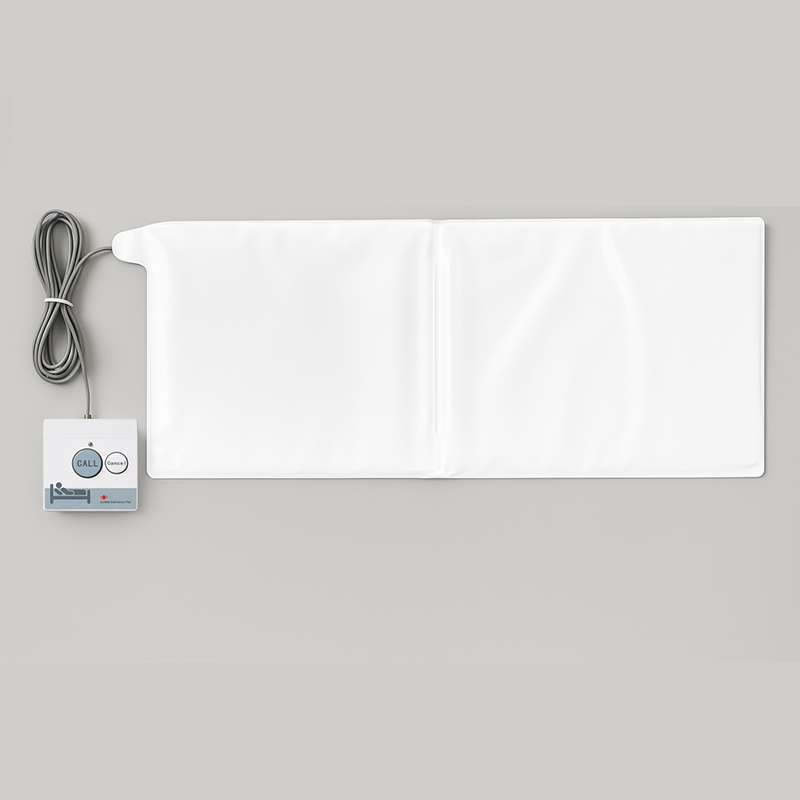
Bed Sensor Alarm Pad Wireless Fall Prevention System↗

bed pad sensor

Bed Sensor Alarm Pad Wireless Fall Prevention System

The MMCall Bed Sensor Alarm Pad helps care staff monitor when a resident leaves or returns to a bed. Used with compatible wireless receivers, it can send bed-status alerts to displays and caregiver watch pagers. A suitable management system can also record events for later review. This pressure-sensitive pad is intended for nursing homes, rehabilitation centers, and other care facilities that need additional bed-exit information. It supports staff awareness but does not replace direct supervision or other fall-risk measures.

Request a Quote1 options
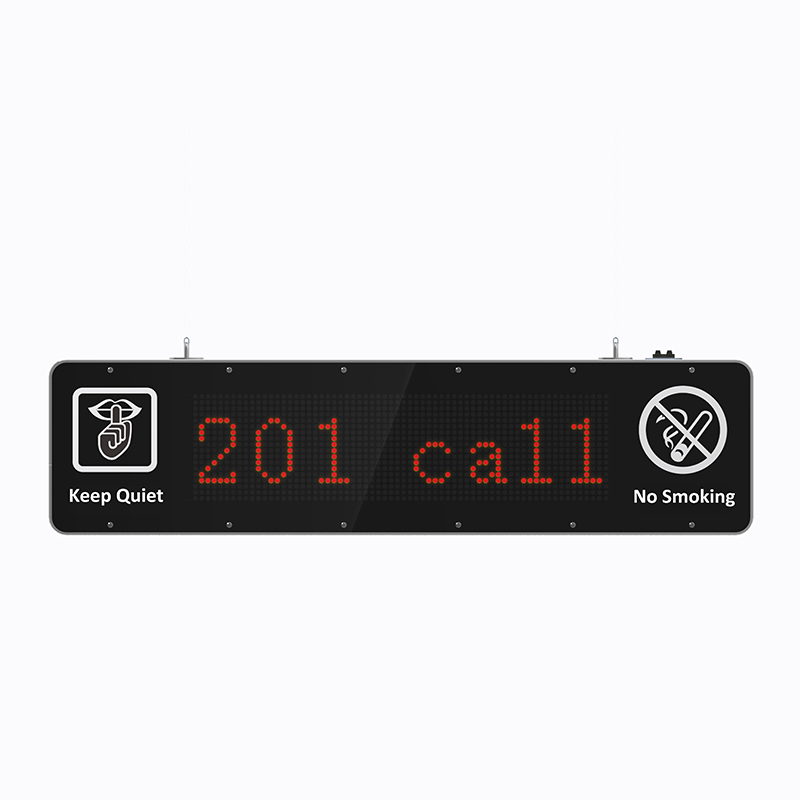
Double Side Corridor Wireless Call Display↗

MMCall • Call System

Double Side Corridor Wireless Call Display

The MMCall Double Side Corridor Wireless Call Display provides a fixed notification screen for compatible wireless nurse call arrangements. Its double-sided format is useful in hallways where staff may approach from either direction. It can be considered for hospitals, nursing homes, and other facilities that want call information visible outside the main nursing station. The display requires matching wireless receiving equipment and an appropriate installation plan. Screen content, voice announcement capability, power requirements, and communication version should be confirmed because the current product page does not specify them.

Request a Quote1 options
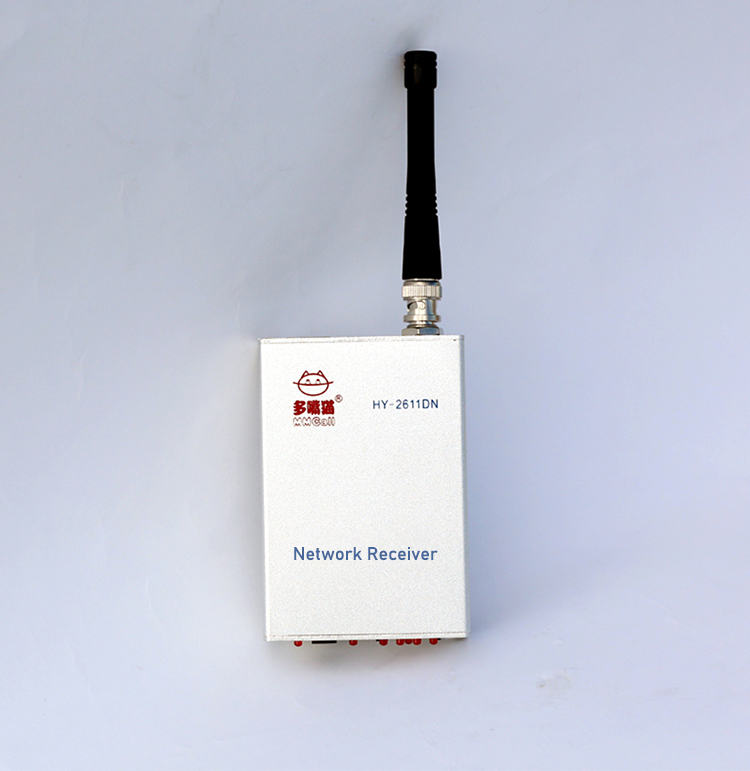
Network Receiver↗

MMCall • Receivers

Network Receiver

The MMCall Network Receiver links compatible wireless calling devices with a wired network connection. It receives call events and passes supported information through a network cable to suitable computer software or management equipment. This makes it useful when an organization wants more than a standalone call display, such as call records or centralized event handling. The receiver can be considered for service management, healthcare calling, and industrial notification projects.

Request a Quote1 options
NS818 Direct Watch Pager↗

NS818 Direct Watch Pager

The NS818 Watch Pager is designed for simple wireless calling installations and can receive notifications directly from FSK compatible call buttons. The screen shows up to three call messages at a time, with page navigation to view earlier messages. Sound alert. One charge lasts approximately 3–5 days; frequent calls may reduce runtime. Its not water-resistant design.

Request a Quote1 options
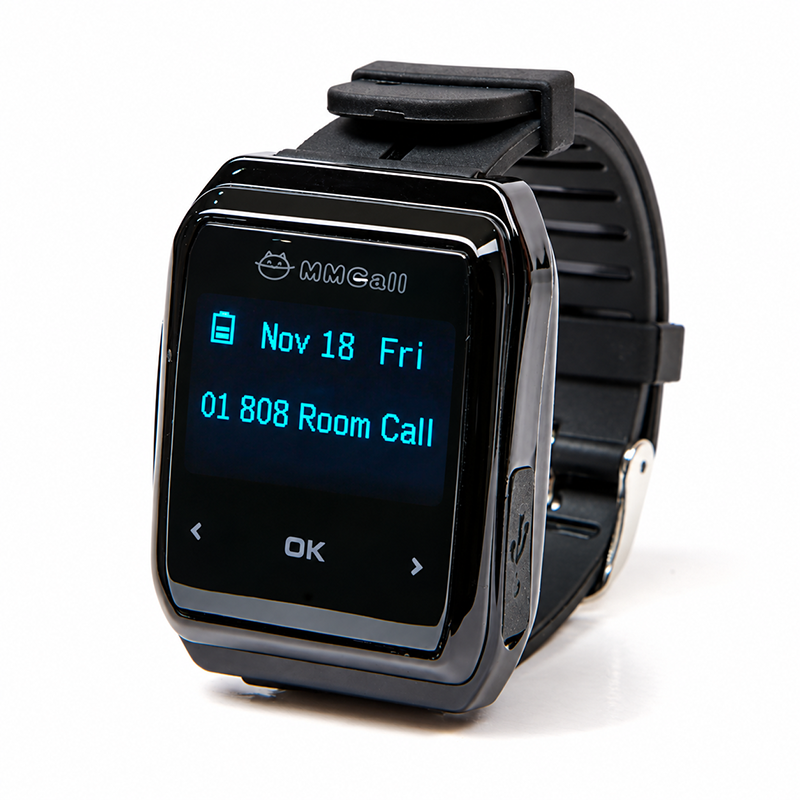
Staff Watch Pager↗

MMCall • Receivers

Staff Watch Pager

The MMCall Staff Watch Pager helps employees receive calling messages in restaurants, hospitals, nursing homes, and factories. Depending on the system, it can receive messages directly from compatible call buttons or through a C or T host. Its display shows up to three messages per screen, and users can turn pages to review earlier calls. Vibration alert. Power on/off settings can be customized. A full charge typically lasts 3–5 days, with shorter battery life when calls are frequent. The water-resistant design handles splashes and handwashing, but is not intended for immersion.

Request a Quote2 options
Choose products or tell us what you need. Our team will confirm pricing and sample availability.Request a Sample